Worklist Properties
There are several properties of the worklist each of which is described in this section:
- The navigation and filter tool bar.
- The title and priorities.
- The list records.
Worklist - Navigation and Filter Tool Bar
See the Report Navigation and Filter Tool Bar section of this manual for more information.
Worklist - Title and Priorities
The worklist title includes the report title, 'Scrubber Worklist', and the status of the worklist, ‘Current As Of 4/3/2017 11:26:10 AM’ as seen below.

|
The worklist columns, see the dotted orange arrow above, include:
Scrubs: the name of the scrub ID, and its number in parenthesis, of the scrub that has failed. See the green arrow above. Colored bands are groups of scrubs. Scrub groups are established in the ScrubParameters table by the Fusion guru.
E: the blank column name, see the red arrow above, for the column that contains 'E' on every record. Clicking on the E opens all the accessions for that scrub in an Excel worksheet. The scrubs show the individual accessions and the accession number links back to that accession in the worklist detail. Viewing work scrubs in Excel allows more flexibility in sorting. However it also negates all of the worklist priority sorting built into the worklists. Use of this function is discouraged.
Total: the total number of accessions that have failed that scrub. The total equals the sum of each priority’s total over all the priorities; Total value = value in Columns A + B + C + D + E + Z for each scrub / group.
The columns named A, B, C, D, E and Z are the priorities which suggest the work order for those accessions.
The highest priority is A and the lowest priority is Z. Generally the priorities are defined as a combination of age of the accession, dollar value of the accession and closeness to the timely filing deadline for the accession. Working with you, Rhodes establishes the priority definitions at time of installation, based on your company's needs.
Some clients define the priorities as:
- A - over 30 days old.
- B - 16 to 30 days old.
- C - 6 to 15 days old.
- D - 2 to 5 days old.
- E - inserted yesterday.
- Z - inserted today.
Worklist - The List Records
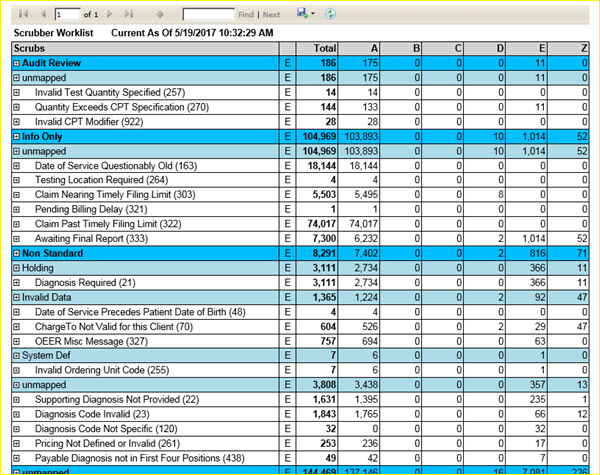
The worklist record includes the name of the scrub, the scrub ID in parenthesis, the total number of accessions that failed this scrub and total accessions for each priority.
Click on the scrub ID, in parenthesis, to see the definition and use of that scrub.
|
The Total number of accessions that failed each scrub is equal to the sum of the accessions in each priority column for each scrub.
The + / - icon in the far left column of each record is inactive on individual scrubs.
If the worklist contains groupings by scrub type, the + / - icon will expand / contract those groups to display / hide individual scrubs. A grouping is denoted by a colored bar on the list.
If there is a grouping, the values for each column, Total and A thru Z, on the colored bar line are the totals over all individual scrubs in that group. The unmapped group are scrubs not assigned to a scrub group or subclass. Scrub group assignment is made in the ScrubParameters table by the Fusion guru.
For example, the group 'Non Standard' above includes the classes; Holding, Invalid Data, System Def and unmapped.

| This document contains confidential and proprietary information owned by the Rhodes Group, Inc. This Information may not be downloaded, copied, or transferred, in any medium, either in whole or in part, except as allowed by the Rhodes Group. Copyright 2017, Rhodes Group Inc. | |
| Version 6.0, Release 1
Reference Manual |
Prepared by Rhodes Group
September 2017 |